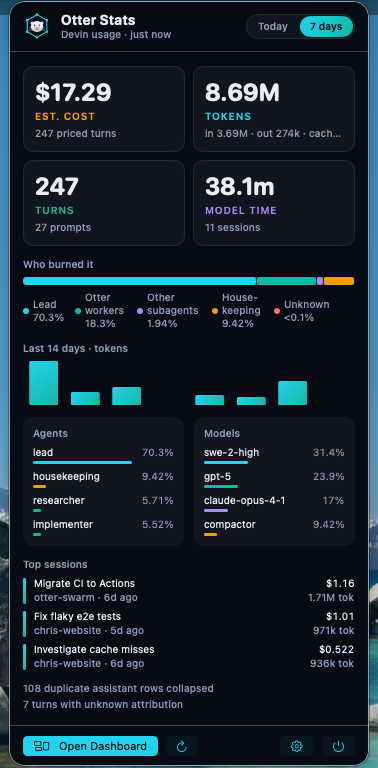
KPIs at a glance
Estimated cost, tokens, turns and model time for the period, with the priced turn count and prompt count underneath.
 Otter Stats

macOS 14 Sonoma or newer · Universal · Free, MIT
Otter Stats reads the local Devin CLI and Devin Desktop database and shows tokens, turns, model time and an estimated cost at list prices, per agent, model, project and session. Read only. Nothing leaves your Mac.
brew install --cask chris-wozniczek/tap/otter-stats
Then open -a OtterStats. The otter appears in your menu bar.
Ad-hoc signed for now (no Apple Developer ID yet). Homebrew clears the Gatekeeper quarantine flag for you; for the manual download, right-click the app and choose Open the first time.
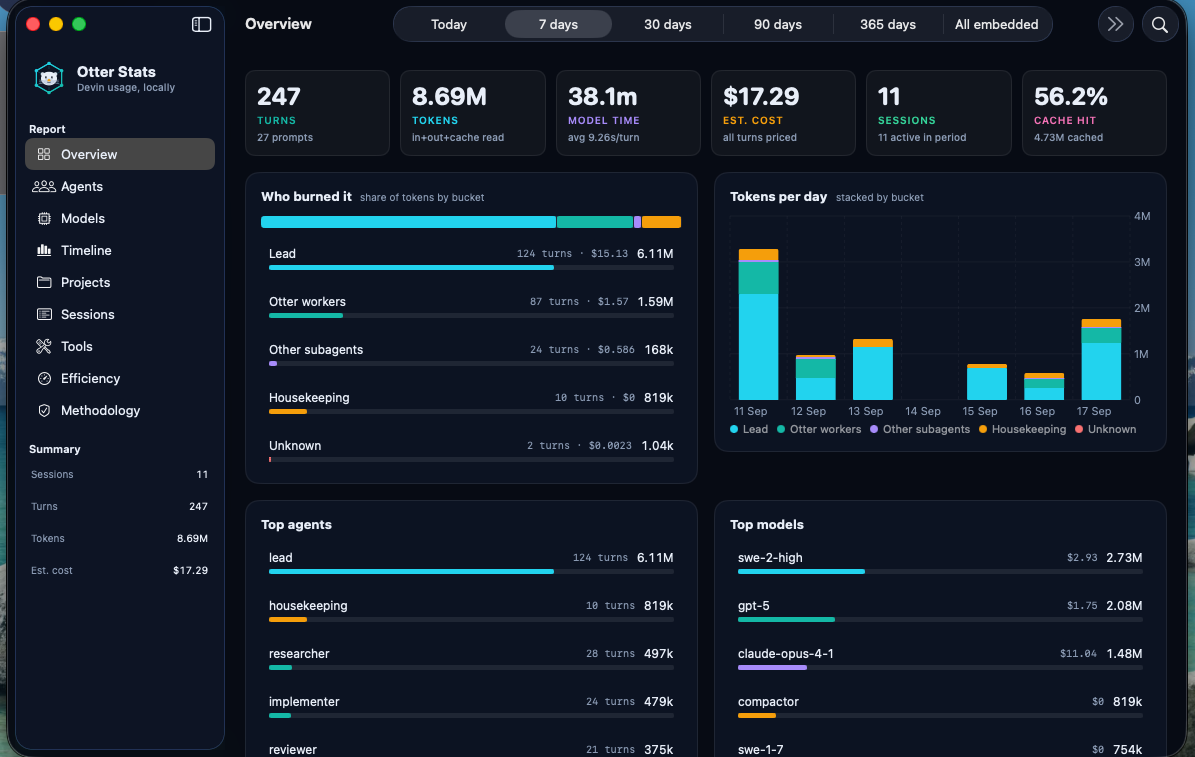
Dashboard
Overview, Agents, Models, Timeline, Projects, Sessions, Tools, Efficiency and Methodology. Period picker from today to everything embedded, plus a custom date range with a calendar, search, a pricing class filter (paid, free tier, unknown), and click to filter on any bucket, agent, model, project or session.
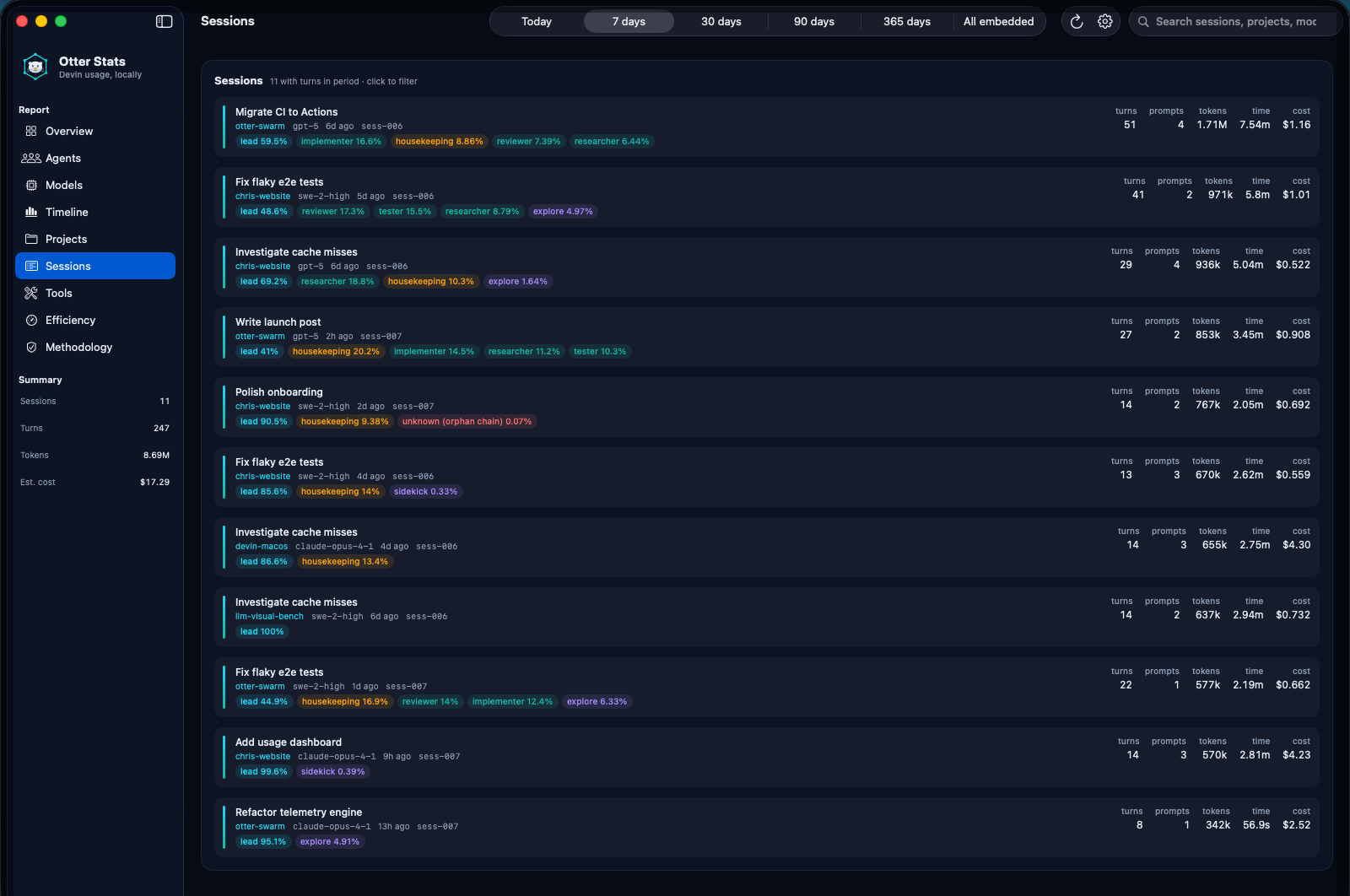
otter statsOtter Stats is the usage side of Otter Swarm's /otter:stats report, packaged as a standalone app for people who don't run the plugin. Attribution is structural: each assistant turn is walked up the message tree to its root. Duplicates are collapsed once. Pricing comes from the same price snapshot.
Duplicate rows, unknown attribution, missing metrics, unpriced models and truncation are all surfaced in the report. When a model has no price, the turn is marked unpriced and the cost shows as a lower bound with a ≥ sign.
Privacy
The sessions database at ~/.local/share/devin/cli/sessions.db is opened read only. There is no account, no telemetry and no server. The only network request the app makes is the optional daily version check against the GitHub Releases API, and it carries nothing about you.
Install
Requirements: macOS 14 Sonoma or newer. Devin CLI or Devin Desktop for real data. No Devin data yet? Turn on demo mode and explore the UI with a synthetic database.
brew install --cask chris-wozniczek/tap/otter-stats
open -a OtterStats
Upgrade with brew upgrade --cask otter-stats. Remove with brew uninstall --cask otter-stats; add --zap to also delete settings and demo data.
Download OtterStats.zip from the latest release, unzip, drag OtterStats.app to /Applications, open it.
The app is ad-hoc signed, so on first launch macOS may ask you to confirm: right-click the app and choose Open, or allow it under System Settings › Privacy & Security.
Latest releasegit clone https://github.com/chris-wozniczek/otter-stats.git
cd otter-stats
Scripts/build-app.sh --zip
open dist/OtterStats.app
Produces a universal, ad-hoc signed dist/OtterStats.app. Set CODESIGN_ID to sign with your own identity.
devin models list once, or it reuses the one Otter Swarm writes to ~/.config/devin/otter/prices.json.Data sources
| What | Default | Override |
|---|---|---|
| Sessions database | ~/.local/share/devin/cli/sessions.db | OTTER_SESSIONS_DB or Settings |
| Price snapshot | ~/.config/devin/otter/prices.json | OTTER_PRICES_PATH or Settings |
| Role pins (drift check) | ~/.config/devin/agents/<role>.md | none |
Methodology
One assistant chat_message row with usage metrics. Duplicate rows for the same message are collapsed once, and the count is reported.
Lead = normal, plan and ask profiles. Otter workers = planner, researcher, implementer, reviewer, tester, interrogator. Other subagent_* profiles = Other subagents. Summarizer and compactor = Housekeeping. Chains that can't be resolved = Unknown.
Input + output + cache read. Cache writes are shown separately.
Per-turn tokens × the price snapshot. Models the snapshot marks as free tier count as $0. It is a list price equivalent of the usage, computed locally, never an invoice.
Every model is Paid, Free tier or Unknown according to the snapshot. Unknown turns are unpriced and turn the total into a lower bound marked ≥. You can filter the whole dashboard by class.
What the free tier turns would have cost at the paid SWE rate (SWE-1.7 when it is in the snapshot). Shown next to the estimate as a simulation, never as a charge.
FAQ
The app opens, but there is nothing to read. Turn on Settings › Demo mode or click Try demo data to generate a deterministic synthetic database in ~/Library/Application Support/OtterStats/ and explore the UI.
The dollar figure is your token usage priced at the per-token list rates from devin models list. It is there so you can compare agents, models and sessions on one scale and see where the usage goes. It is not what you are charged. On a plan your actual cost is the plan. Models the snapshot marks as free tier count as $0, and a separate Equivalent paid cost shows what those turns would have cost at the paid SWE rate, labelled as a simulation.
At least one model in the period has no entry in the price snapshot. Those turns are counted as unpriced and the total is a lower bound. Run Settings › Refresh prices to fetch a fresh snapshot.
No. It is an independent open source app that reads the local database the Devin CLI writes. Cost figures are estimates from a price snapshot and are not a bill.
The release build is a universal binary for Apple silicon and Intel Macs, on macOS 14 Sonoma or newer.
At launch and then once a day the app asks the GitHub Releases API for the latest version. When a newer release exists you get a banner in the popover. Settings › Updates has Check now and lets you unskip a version. The app never downloads or installs updates itself; use brew upgrade --cask otter-stats or the release page.
Yes. OtterStatsCore is a Swift package with no UI dependency: read only SQLite reader, tree attribution, usage cube, slicing and filters, prices and a synthetic fixture generator. It can back a widget extension or a CLI.
brew install --cask chris-wozniczek/tap/otter-stats